Years ago, as a student, I had a part-time job cutting out product photos for an online clothing store. Every shirt, every jacket, every pair of jeans had to be lifted off its background by hand in Photoshop. One garment took me fifteen to thirty minutes with the pen tool, clicking point by point around every collar and sleeve. By the end of a shift my eyes hurt and my wrist ached.
So the first time I removed a background on my phone with a single tap, I actually laughed out loud. What used to be half an hour of careful work now takes about three seconds. If you want to remove a background from an image for free, the tools in 2026 are almost unfairly good. Here is exactly how I do it now, and which free tools are actually worth your time.
Why this got so easy (and why it matters)
The old way meant tracing the edge of a subject manually. The pen tool in Photoshop gave clean results, but it was slow and genuinely painful for anything with hair or fur. Modern tools use AI that recognizes the subject of a photo instantly and separates it from the background on its own. You upload, it thinks for a moment, and you get a clean cutout with a transparent background.
That matters for more people than you would think. I use background removal for blog thumbnails. A friend uses it for product listings. I have also cleaned up photos for printed patient handouts in my day job. Anywhere you need a subject on a clean or transparent background, this skill saves real time.

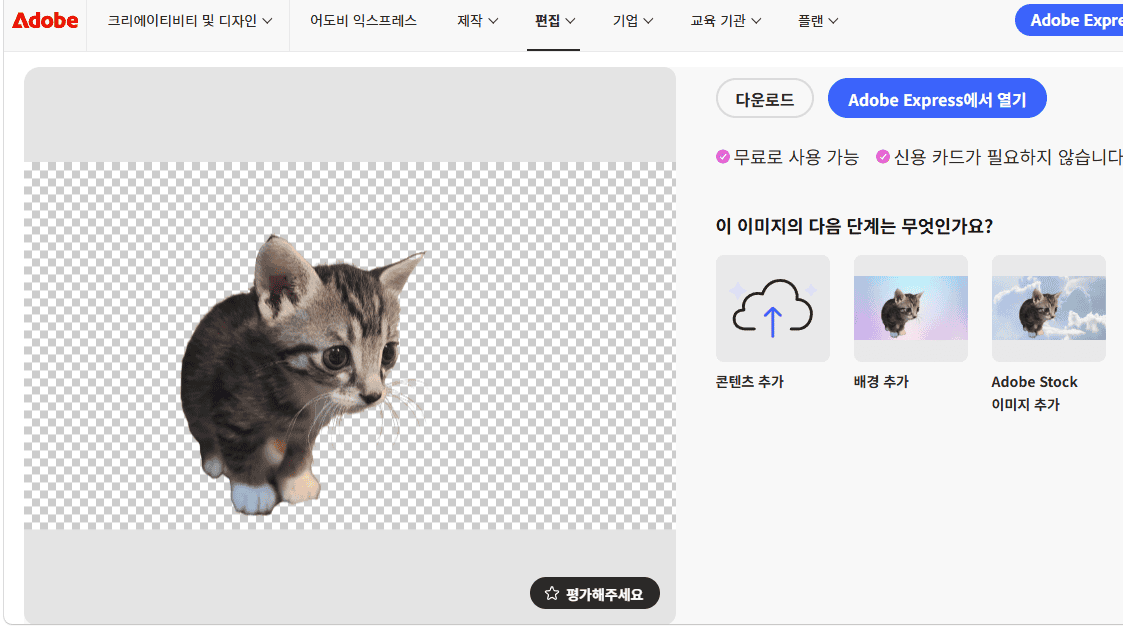
While writing this post I went back and tested the current free options again, because pricing and free limits change constantly. A few tools I assumed were free turned out to be paywalled now, and one I had ignored turned out to be the best free pick. Here is what held up.
The fastest way to remove a background from an image
If you just need it done right now and you are on your phone, you already have the tool in your pocket.
On a recent Samsung Galaxy, open the photo in Gallery, press and hold on the subject for a second, and the phone lifts it out as a sticker you can save or share. On an iPhone, open the photo in Photos, touch and hold the subject, and tap “Copy” or “Share.” Both are free, work offline, and take seconds. This is what I reach for ninety percent of the time now.
The only catch is control. Phone tools are fast but you cannot fine-tune a tricky edge. For that, you want a proper editor, which brings us to the desktop and web options.
The best free background removers I tested
Adobe Express is my top free pick in 2026. The background remover is part of the free plan, it works at full resolution, and it does not stamp a watermark on your result. You just need a free Adobe account. For most blog and social images, this is all you need. You can try it directly on the Adobe Express background remover page.
remove.bg is the one everybody knows, and it is genuinely the fastest one-click tool. Upload, and the cutout appears almost instantly. The trade-off is the free download: it is capped at low resolution (about 0.25 megapixels, roughly 612 by 408 pixels). That is fine for a small thumbnail but too small to print or to list on a marketplace, and full resolution costs money per image. I still keep remove.bg bookmarked for quick previews.
Erase.bg fills the exact gap remove.bg leaves. It lets you download higher-resolution cutouts for free, so when I need a larger file without paying, this is where I go.
Photopea is a free, browser-based editor that looks and works a lot like Photoshop. It has automatic selection tools plus full manual control, so when a photo has messy edges or fine hair that the one-click tools miss, I finish the job here. There is a learning curve, but nothing to install and nothing to pay.
A quick warning on one popular name: Canva’s background remover is not free. It is locked behind Canva Pro, which costs around $12.99 a month. If you already pay for Canva it is convenient, but do not sign up just for this. Adobe Express does the same thing for free.
Step by step: remove a background for free on the web
Here is the workflow I use for a blog image when I want a clean result without spending anything.
- Go to the Adobe Express background remover and sign in with a free account.
- Upload your photo, or drag it onto the page.
- Wait a few seconds while the AI detects the subject and removes the background.
- Check the edges. If a corner of the background is left behind, use the refine or erase brush to clean it up.
- Download. Choose PNG if you want to keep the transparent background, or place the subject on a new color or scene first.
That is the whole process. The first time you do it, the speed feels almost suspicious after years of doing it the hard way.
Which one should you use?
| Tool | Free? | Best for |
|---|---|---|
| Your phone (Galaxy/iPhone) | Yes | Instant cutouts, no editing needed |
| Adobe Express | Yes, full resolution | Most blog and social images |
| remove.bg | Low-res only | Fast previews and small thumbnails |
| Erase.bg | Yes, higher resolution | When you need a bigger file free |
| Photopea | Yes | Tricky edges and manual control |
| Canva | Pro only ($12.99/mo) | People already paying for Canva |
My honest advice: try your phone first, use Adobe Express when you want more control or a transparent PNG, and keep Photopea in your back pocket for the hard photos.
If you create a lot of visual content, you might also like my guide to the best free screen recorders with no watermark, which pairs well with background removal for making clean thumbnails and tutorials.
FAQ
Is it legal to remove the background from any image? You can edit images you own or have the rights to use. Removing the background does not give you the right to reuse someone else’s copyrighted photo, so stick to your own images or properly licensed ones.
What file format keeps the transparent background? Save as PNG. A JPG cannot store transparency and will fill the empty ar
핑백: 5 Best Free AI Writing Tools for Content Creators (2026) - ToolFindly
핑백: How to Convert PDF to Word for Free: 3 Simple Ways (2026) - ToolFindly
핑백: 5 Best Free AI Music Generators for Video Creators in 2026 - ToolFindly